

You tap “Pay Now” in a shopping app. The money leaves your account, but the order never shows up. Frustrating, right?
Problems like this usually come down to one thing: something wasn’t tested properly.
Every app, website, and program you use has gone through some form of software testing before reaching you. It’s the quiet safety net that catches bugs, fixes crashes, and makes sure software actually does what it promises.
This guide explains what software testing is, why it matters, the main types, and the basic methods testers use every day. No coding background needed.
Software Testing At a Glance
| Detail | Information |
|---|---|
| Topic | Software Testing |
| Also Known As | QA (Quality Assurance) testing, application testing |
| Main Goal | Find bugs and confirm software works as expected |
| Two Main Approaches | Manual testing and automated testing |
| Four Testing Levels | Unit, Integration, System, Acceptance |
| Main Categories | Functional and non-functional testing |
| Popular Tools | Selenium, Playwright, JUnit, Postman, JMeter |
| Key Certification | ISTQB Certified Tester Foundation Level (CTFL) |
| Target Readers | Students, beginners, aspiring QA testers, business owners |
What Is Software Testing?
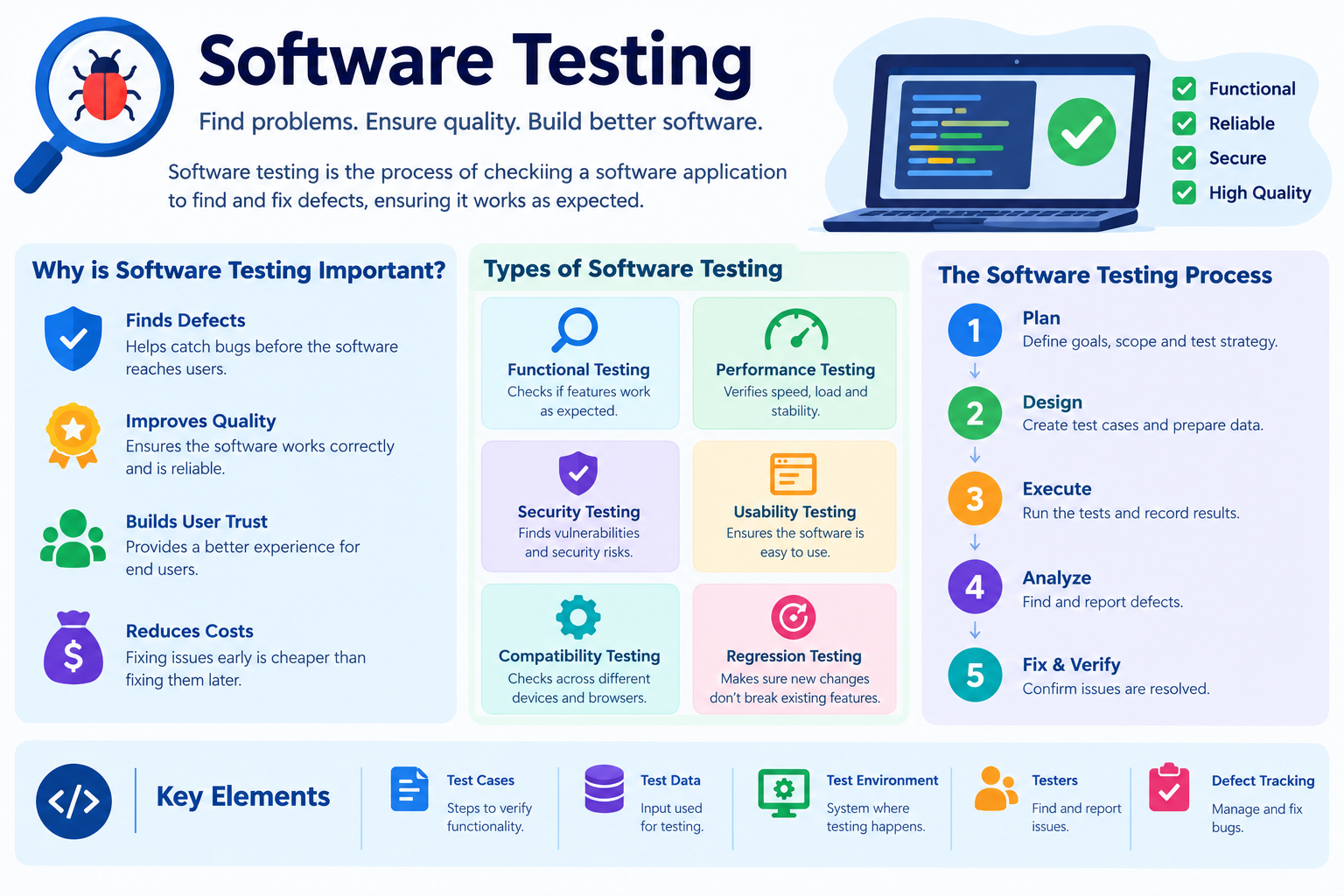
Software testing is the process of checking a program to make sure it works correctly, safely, and smoothly.
Testers try the software in different ways. They click buttons, enter data, push it to its limits, and compare what happens with what should happen. When something goes wrong, they report it as a bug (or defect) so developers can fix it.
In short, testing answers two big questions:
- Does the software do what it’s supposed to do?
- Does it do it well, securely, and without breaking?
Testing applies to every kind of program, from the operating system on your laptop to the apps on your phone. If you’re new to how software is built and grouped, start with What Is Software? Types, Examples, and Uses.
Why Is Software Testing Important?
Skipping testing is risky. A single bug can cost money, damage trust, or even put people in danger.
Here’s what good testing protects:
- Users: Fewer crashes, lost files, and frustrating errors
- Security: Weak spots get fixed before hackers find them
- Money: Fixing bugs early is far cheaper than fixing them after launch
- Reputation: Reliable software builds customer trust
- Safety: Critical systems in hospitals, banks, and cars must work perfectly
IBM’s guide to software testing defines it as the process of evaluating and verifying that software works correctly, securely, and efficiently according to its requirements. IBM also points to a real-world warning: in July 2024, a faulty software update from a cybersecurity company caused widespread crashes on Windows systems. Delta Air Lines was hit hardest among U.S. airlines, with thousands of cancelled flights and estimated losses above $500 million. It’s a powerful reminder of why testing, especially of third-party updates, matters so much.
Verification vs Validation
You’ll hear these two words often in testing. They sound similar but mean different things.
| Term | Question It Asks | Example |
|---|---|---|
| Verification | “Are we building the product right?” | Checking the code matches the design plan |
| Validation | “Are we building the right product?” | Checking the app actually meets user needs |
Good testing covers both.
Basic Methods of Software Testing
Before diving into types, let’s look at the core methods. These describe how testing is done.
1. Manual Testing vs Automated Testing
This is the most basic split in software testing.
Manual Testing
A human tester uses the software just like a real user would. They click, type, scroll, and check results by hand.
- ✅ Great for checking design, ease of use, and new features
- ✅ No coding needed
- ❌ Slow for repetitive tasks
- ❌ Humans can miss things when tired
Automated Testing
Testers write scripts that run tests automatically using special tools.
- ✅ Fast and repeatable
- ✅ Perfect for running the same tests again and again
- ❌ Takes time and skill to set up
- ❌ Can’t judge things like “Does this look nice?”
| Feature | Manual Testing | Automated Testing |
|---|---|---|
| Who runs it | A human tester | A script or tool |
| Speed | Slower | Much faster |
| Best for | Usability, exploratory testing | Regression, repetitive tests |
| Skills needed | Attention to detail | Coding and tool knowledge |
| Example tools | Spreadsheets, bug trackers | Selenium, Playwright, JUnit |
Most teams use both. Humans explore and judge. Machines repeat and verify.
2. Black Box, White Box, and Grey Box Testing
These methods describe how much the tester knows about the code inside.
Black Box Testing
The tester can’t see the code. They only check inputs and outputs. Think of it as testing a vending machine: you press a button and check if the right snack drops.
White Box Testing
The tester can see and understands the code. They check internal logic, paths, and conditions. Developers often do this.
Grey Box Testing
A mix of both. The tester has partial knowledge of the inside, which helps them design smarter tests.
| Method | Code Visible? | Usually Done By |
|---|---|---|
| Black Box | No | QA testers, end users |
| White Box | Yes | Developers |
| Grey Box | Partly | Technical testers |
3. Static vs Dynamic Testing
- Static testing checks the software without running it. Examples: reviewing code, reading requirements, checking documents.
- Dynamic testing checks the software while it runs. Examples: clicking through screens, running test scripts.
Static testing catches mistakes early, sometimes before a single line of code is executed.
The Four Levels of Software Testing
Testing happens in stages, from small pieces to the full product.
1. Unit Testing
Tests the smallest piece of code, like a single function. For example, does the “add to cart” function correctly add one item? Developers usually write these tests.
2. Integration Testing
Tests how different pieces work together. For example, does the cart correctly pass the total price to the payment system?
3. System Testing
Tests the complete application from start to finish. Testers check the whole product in an environment that feels like the real world.
4. Acceptance Testing
Checks whether the software is ready for users. Often done by the client or real users to confirm it meets their needs before launch.
Easy way to remember: Small → Connected → Complete → Approved.
Main Types of Software Testing
Testing types fall into two big groups: functional and non-functional.
Functional Testing Types
Functional testing checks what the software does. Does each feature behave as expected?
- Smoke Testing: A quick check that the most basic features work. If the app won’t even open, there’s no point testing deeper.
- Sanity Testing: A fast check on specific features after a small change or bug fix.
- Regression Testing: Makes sure new updates didn’t break old features. One of the most important (and most automated) test types.
- API Testing: Checks that different software parts communicate correctly through their interfaces.
- Exploratory Testing: Testers explore freely without a script, hunting for unexpected bugs.
- User Acceptance Testing (UAT): Real users confirm the software works for them in real-life situations.
Non-Functional Testing Types
Non-functional testing checks how well the software works.
- Performance Testing: How fast and responsive is the software?
- Load Testing: How does it handle normal and peak numbers of users?
- Stress Testing: What happens when it’s pushed beyond its limits? When does it break?
- Security Testing: Can hackers break in or steal data?
- Usability Testing: Is it easy and pleasant to use?
- Compatibility Testing: Does it work across different devices, browsers, and operating systems?
- Recovery Testing: Can it bounce back after a crash or failure?
Compatibility testing is especially important because apps rely on the system software underneath them, like Windows, macOS, or Android. Learn more about that foundation in What Is System Software? Types and Examples.
Quick Summary Table
| Category | Checks | Example Types |
|---|---|---|
| Functional | What the software does | Smoke, regression, API, UAT |
| Non-Functional | How well it works | Performance, security, usability, load |
The Software Testing Process (Step by Step)
Most teams follow a structured cycle, often called the Software Testing Life Cycle (STLC):
- Understand Requirements: Learn what the software should do.
- Plan the Tests: Decide what to test, how, who, and when.
- Design Test Cases: Write clear steps and expected results.
- Set Up the Test Environment: Prepare devices, data, and tools.
- Run the Tests: Execute manual or automated tests.
- Report Bugs: Log every defect with clear details.
- Retest and Close: Confirm fixes work, then wrap up with a summary report.
A Simple Test Case Example
Let’s say you’re testing the login page of a mobile app.
| Field | Details |
|---|---|
| Test Case ID | TC_Login_01 |
| Title | Login with valid email and password |
| Precondition | User has a registered account |
| Steps | 1. Open app 2. Enter valid email 3. Enter valid password 4. Tap “Login” |
| Expected Result | User lands on the home screen |
| Actual Result | (Filled in during testing) |
| Status | Pass / Fail |
Now testers would also try the opposite cases:
- Wrong password → Should show an error message
- Empty fields → Should ask the user to fill them in
- Very long email → Should not crash the app
Testing both “happy paths” and “unhappy paths” is what makes testing thorough. This same approach applies to every app type, from banking to social media. See how different apps are grouped in What Is Application Software? Uses and Examples.
Popular Software Testing Tools
| Tool | Used For |
|---|---|
| Selenium | Automating web browser tests |
| Playwright | Modern web app automation |
| JUnit / TestNG | Unit testing for Java |
| PyTest | Unit testing for Python |
| Postman | API testing |
| Apache JMeter | Performance and load testing |
| Appium | Mobile app testing |
| Jira | Bug tracking and test management |
Software Testing as a Career
Software testing is a solid career path, and you don’t always need to be an expert coder to start. Many people begin in manual testing and grow into automation.
Common roles include:
- QA Tester / Manual Tester
- Automation Test Engineer
- SDET (Software Development Engineer in Test)
- Performance Tester
- Security Tester
- QA Lead / Test Manager
If you want a recognized credential, the most popular starting point is the ISTQB Foundation Level. According to the official ISTQB website, the board had administered 1.5 million exams and issued more than 1.1 million certifications across over 130 countries as of May 2025. ISTQB also maintains a widely used testing glossary, and its terminology is treated across the industry as a shared language for testers worldwide.
Common Myths About Software Testing
Myth 1: “Testing proves software has no bugs.”
Reality: Testing reduces risk. It shows bugs exist, but it can’t prove a program is 100% bug-free.
Myth 2: “Testing happens only at the end.”
Reality: Modern teams test from the very beginning. This is often called shift-left testing.
Myth 3: “Automation replaces manual testers.”
Reality: Automation handles repetition. Humans are still needed for judgment, creativity, and usability checks.
Myth 4: “Anyone can test without training.”
Reality: Good testing needs strategy, attention to detail, and knowledge of techniques.
Frequently Asked Questions
What is software testing in simple words?
It’s checking a program to find mistakes and make sure it works the way it should.
What are the main types of software testing?
The two main groups are functional testing (what the software does) and non-functional testing (how well it performs). Common types include unit, integration, regression, performance, and security testing.
What’s the difference between manual and automated testing?
Manual testing is done by humans clicking through the software. Automated testing uses scripts and tools to run tests automatically.
Is software testing a good career?
Yes. Demand stays strong as more businesses rely on software. Many testers start in manual QA and move into automation or specialized roles.
Do I need coding skills to become a tester?
Not for manual testing. But learning basic coding helps a lot if you want to move into automation.
Final Thoughts
Software testing is what turns a rough program into something people can trust. It catches bugs early, protects user data, saves money, and keeps apps running smoothly.
Remember the basics:
- Methods: Manual vs automated, black box vs white box
- Levels: Unit → Integration → System → Acceptance
- Types: Functional (what it does) and non-functional (how well it does it)
Whether you’re a student, a future QA engineer, or a business owner launching an app, understanding testing helps you build, and choose, better software.
Sources:
📘 Disclaimer
This article is for general informational and educational purposes only. Tool names, certifications, and industry figures mentioned are based on publicly available information at the time of writing and may change. Brand and product names are used for reference only and do not imply endorsement. For professional software projects, always follow your organization’s testing standards and consult qualified QA professionals.