

Before anyone builds a house, an architect draws the plan. Where do the rooms go? How do the pipes connect? Can the roof handle heavy rain?
Software works the same way.
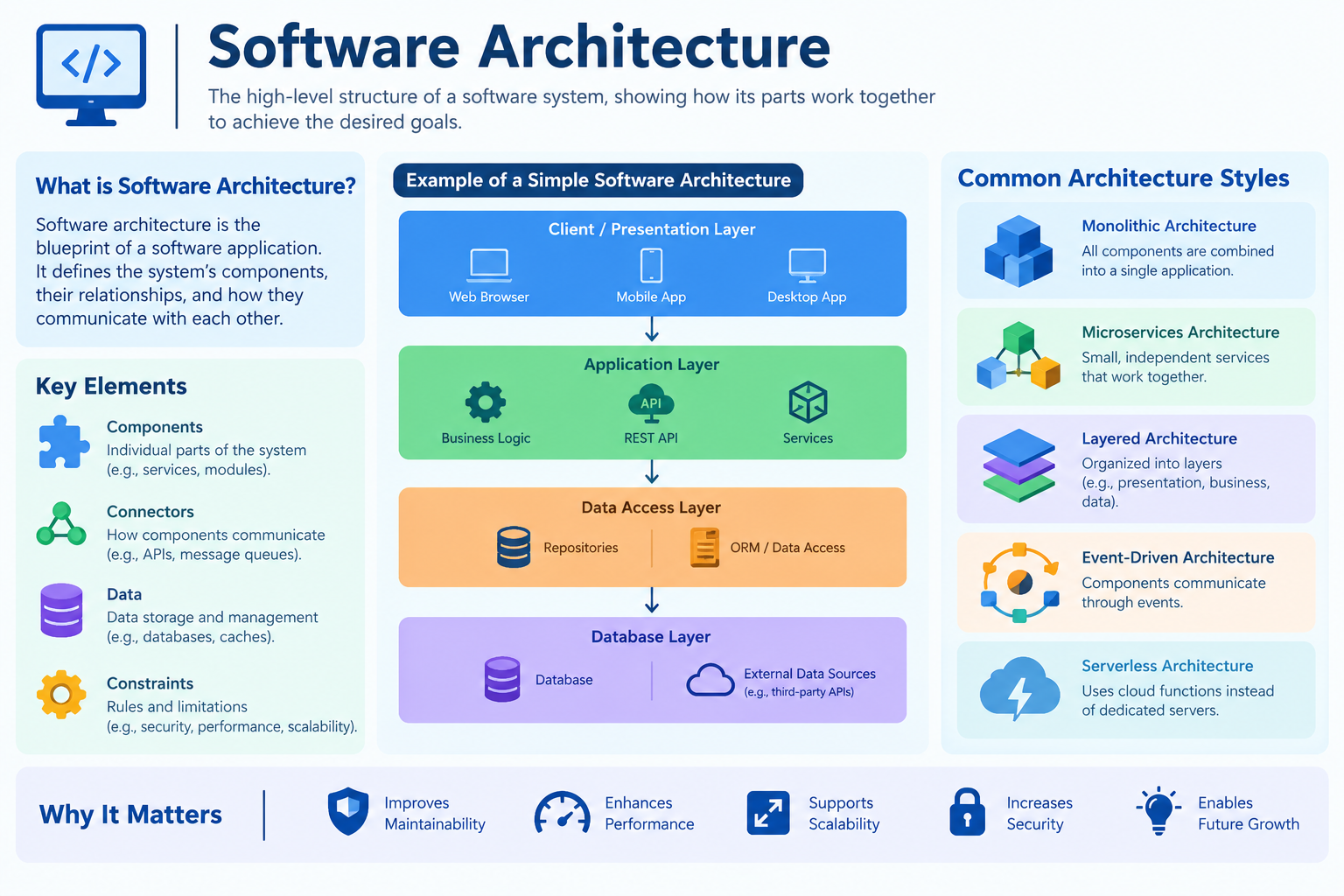
Before developers write thousands of lines of code, someone has to decide how the whole system fits together. That plan is called software architecture. Get it right, and an app grows smoothly for years. Get it wrong, and every new feature becomes a painful mess.
This guide explains what software architecture is, why it matters, the most common types, and the core principles that guide good design. You don’t need to be a programmer to follow along.
Software Architecture At a Glance
| Detail | Information |
|---|---|
| Topic | Software Architecture |
| Simple Definition | The high-level structure of a software system |
| Main Purpose | Organize components and how they connect |
| Common Types | Layered, Client-Server, Monolithic, Microservices, Event-Driven, MVC, Serverless |
| Key Principles | Separation of concerns, modularity, loose coupling, SOLID, KISS, DRY |
| Quality Goals | Scalability, security, reliability, performance, maintainability |
| Who Designs It | Software architects, senior developers, tech leads |
| Target Readers | Students, beginner developers, tech enthusiasts, business owners |
What Is Software Architecture?
Software architecture is the big-picture blueprint of a software system.
It describes:
- The main parts (components) of the system
- How those parts talk to each other
- Where data is stored and how it flows
- The rules and decisions that shape the whole design
Think of a restaurant. The kitchen cooks. The waiters take orders. The cashier handles payments. Each has a clear job, and they communicate in a set way. Software architecture creates that same kind of order inside a program.
Every program has an architecture, whether it was planned carefully or grew by accident. The goal is to make it intentional. If you’re new to how software itself is defined and grouped, read What Is Software? Types, Examples, and Uses first.
Software Architecture vs Software Design
These two terms overlap, but they work at different levels.
| Aspect | Software Architecture | Software Design |
|---|---|---|
| Level | High-level, big picture | Low-level, detailed |
| Focus | Overall structure and components | Individual modules, classes, functions |
| Question | “How is the system organized?” | “How does this part work inside?” |
| Analogy | City map | Street-level building plans |
| Changes | Hard and costly to change later | Easier to adjust |
Simply put: architecture decides the shape; design fills in the details.
Why Is Software Architecture Important?
A strong architecture pays off for years. A weak one creates problems that keep growing.
Good architecture helps you:
- Scale up: Handle more users without crashing
- Add features faster: New parts plug in without breaking old ones
- Fix bugs easily: Problems stay isolated to one area
- Stay secure: Sensitive data is protected by design
- Save money: Less rework, fewer emergency fixes
- Work in teams: Different teams can build different parts at the same time
Poor architecture often leads to what developers jokingly call a “big ball of mud”: tangled code where changing one thing breaks five others.
Main Types of Software Architecture
Different problems need different structures. Here are the most widely used architecture styles.
Microsoft’s Azure Architecture Center guide to architecture styles describes an architecture style as a family of architectures that share certain traits. It explains that each style places constraints on a design, and following those constraints produces useful properties. For example, microservices require each service to have one responsibility and keep its own data, which lets teams deploy services independently and isolate failures. Microsoft also stresses that every style has trade-offs, so teams should focus on why they pick a style, not just how to build it.
1. Layered (N-Tier) Architecture
The software is split into horizontal layers, each with one job. A typical setup has:
- Presentation layer: What users see (screens, buttons)
- Business logic layer: The rules and calculations
- Data layer: Where information is stored
Each layer only talks to the layer directly below it.
- ✅ Simple, organized, easy to understand
- ✅ Great for traditional business apps
- ❌ Changes can ripple across several layers
- Example: Many banking portals and company websites
2. Client-Server Architecture
The system has two main roles:
- Client: Requests services (your browser or phone app)
- Server: Provides services (stores data, processes requests)
- ✅ Central control of data and security
- ❌ If the server goes down, clients can’t work
- Example: Email apps, websites, online games
3. Monolithic Architecture
The whole application is built as one single unit. All features live in the same codebase and run together.
- ✅ Easy to build and launch at first
- ✅ Simple testing and deployment for small apps
- ❌ Gets harder to manage as the app grows
- ❌ One bug can bring down the whole system
- Example: Early versions of many startups’ products
4. Microservices Architecture
The app is split into many small, independent services. Each one handles a single job (like payments, user accounts, or search) and communicates through APIs.
- ✅ Each service can be updated and scaled separately
- ✅ Teams can work independently
- ❌ More complex to manage and monitor
- ❌ Needs strong DevOps skills
- Example: Large streaming platforms and e-commerce giants
Monolithic vs Microservices: Quick Comparison
| Feature | Monolithic | Microservices |
|---|---|---|
| Structure | One big unit | Many small services |
| Deployment | All at once | Each service separately |
| Scaling | Scale the whole app | Scale only what’s needed |
| Failure Impact | Can crash everything | Usually isolated |
| Best For | Small to medium apps, startups | Large, complex, fast-changing apps |
| Complexity | Low at first | High from the start |
5. Event-Driven Architecture
Components react to events: things that happen, like “order placed” or “payment received.” One part announces an event, and other parts respond to it.
- ✅ Fast, real-time responses
- ✅ Parts stay loosely connected
- ❌ Harder to track and debug event flows
- Example: Stock trading systems, IoT devices, notification systems
6. Model-View-Controller (MVC)
A popular pattern that splits an app into three parts:
- Model: Handles data and logic
- View: Displays information to the user
- Controller: Handles user input and connects the two
- ✅ Clean separation makes code easier to maintain
- Example: Many web frameworks like Django, Ruby on Rails, and ASP.NET MVC
7. Serverless Architecture
Developers write small functions that run only when needed. A cloud provider manages all the servers behind the scenes.
- ✅ No server management
- ✅ Pay only for what you use
- ❌ Less control over the environment
- Example: Image resizing on upload, chatbot replies, scheduled tasks
8. Service-Oriented Architecture (SOA)
An older cousin of microservices. The system is built from reusable services that communicate over a network, often through a shared messaging system.
- Example: Large enterprise systems in banking and insurance
9. Peer-to-Peer (P2P) Architecture
Every computer (peer) acts as both client and server. There’s no central boss.
- Example: File-sharing networks and some blockchain systems
Core Principles of Good Software Architecture
Architecture styles tell you the shape. Principles tell you how to build that shape well.
1. Separation of Concerns
Each part of the system should handle one clear job. Don’t mix user interface code with database code. Keeping concerns separate makes everything easier to understand and change.
2. Modularity
Break the system into independent modules, like LEGO blocks. Each module can be built, tested, and replaced on its own.
3. Loose Coupling and High Cohesion
- Loose coupling: Parts depend on each other as little as possible.
- High cohesion: Everything inside one part is closely related.
Together, they mean changes in one area rarely break another.
4. SOLID Principles
A famous set of five rules for clean, flexible code:
| Letter | Principle | Simple Meaning |
|---|---|---|
| S | Single Responsibility | One part, one job |
| O | Open/Closed | Open to extension, closed to modification |
| L | Liskov Substitution | Replacements should work like the original |
| I | Interface Segregation | Don’t force parts to use what they don’t need |
| D | Dependency Inversion | Depend on abstractions, not specific details |
5. KISS (Keep It Simple, Stupid)
Choose the simplest solution that works. Complexity creates bugs.
6. DRY (Don’t Repeat Yourself)
Write logic once and reuse it. Copy-pasted code multiplies mistakes.
7. YAGNI (You Aren’t Gonna Need It)
Don’t build features “just in case.” Add them when they’re actually needed.
8. Scalability by Design
Plan from the start for growth in users, data, and traffic.
9. Security by Design
Build protection in from day one: data encryption, access control, and safe authentication. Security bolted on later is weaker and costlier.
Quality Attributes Every Architecture Should Support
Great architecture isn’t just about structure. It’s about how well the system behaves.
The AWS Well-Architected Framework offers a practical way to think about this. Amazon Web Services built it from best practices gathered across hundreds of thousands of customer systems, and organizes it around six pillars: operational excellence, security, reliability, performance efficiency, cost optimization, and sustainability. AWS also provides a free assessment tool so teams can regularly review their workloads and spot high-risk issues.
Here’s what those qualities mean in plain words:
| Quality | What It Means |
|---|---|
| Scalability | Grows smoothly as users increase |
| Reliability | Keeps working and recovers fast from failures |
| Performance | Responds quickly and uses resources well |
| Security | Protects data and blocks unauthorized access |
| Maintainability | Easy to update, fix, and improve |
| Cost Efficiency | Avoids wasting money on unused resources |
| Sustainability | Minimizes environmental impact |
A Real-World Example: A Food Delivery App
Let’s see how architecture choices play out in a real app.
Starting small (Monolithic):
A new food delivery startup builds one app that handles users, restaurants, orders, and payments together. It’s quick to launch and easy to manage with a small team.
Growing big (Microservices):
As millions of users join, the company splits the app into services:
- User Service: Sign-ups, logins, profiles
- Restaurant Service: Menus and availability
- Order Service: Placing and tracking orders
- Payment Service: Secure transactions
- Notification Service: Order updates and alerts
Adding events (Event-Driven):
When a customer places an order, an “Order Placed” event triggers the restaurant notification, payment processing, and delivery assignment at the same time.
Now, if the notification service has a problem, customers can still browse and order food. That’s the power of good architecture.
The food app is a type of application software, and it runs on servers and phones powered by system software underneath. Learn how these layers connect in What Is Application Software? Uses and Examples and What Is System Software? Types and Examples.
How to Choose the Right Architecture
There’s no single “best” architecture. Ask these questions:
- How big is the project? Small apps often do fine as monoliths.
- How fast will it grow? Rapid growth favors microservices or serverless.
- How skilled is the team? Complex styles need experienced engineers.
- What’s the budget? Simpler designs cost less to build and run.
- Does it need real-time responses? Consider event-driven designs.
- How often will it change? Frequent updates favor modular, loosely coupled styles.
Golden rule: Start simple. Evolve the architecture as real needs appear.
What Does a Software Architect Do?
A software architect is the person who makes these big-picture decisions. Their job includes:
- Choosing the architecture style
- Picking technologies and tools
- Defining how components communicate
- Balancing cost, speed, security, and quality
- Creating diagrams and documentation
- Guiding developers and reviewing designs
- Planning for future growth
Most architects start as developers and move up after years of hands-on experience.
Common Architecture Mistakes to Avoid
- Over-engineering: Using microservices for a tiny app that doesn’t need them
- No clear plan: Letting the structure grow randomly
- Ignoring security until the end
- Tight coupling: Making every part depend heavily on others
- Skipping documentation: Leaving new team members confused
- Chasing trends: Picking a style because it’s popular, not because it fits
Frequently Asked Questions
What is software architecture in simple words?
It’s the overall plan that shows how the parts of a software system are organized and how they work together.
What are the main types of software architecture?
Common types include layered, client-server, monolithic, microservices, event-driven, MVC, serverless, SOA, and peer-to-peer.
Is microservices better than monolithic?
Not always. Microservices suit large, complex, fast-changing apps. Monoliths are often better for small projects and new startups.
What are the most important architecture principles?
Separation of concerns, modularity, loose coupling, high cohesion, SOLID, KISS, DRY, and designing for scalability and security.
Do I need to be a programmer to understand software architecture?
Not to grasp the basics. But becoming a software architect usually requires strong programming experience.
Final Thoughts
Software architecture is the foundation every app is built on. It decides how parts connect, how data flows, and how well the system grows, performs, and stays secure.
Remember the essentials:
- Types give your system its shape: layered, monolithic, microservices, event-driven, and more.
- Principles keep that shape clean: separation of concerns, modularity, loose coupling, SOLID, and simplicity.
- Quality goals measure success: scalability, reliability, security, performance, and cost.
Start simple, design with purpose, and let your architecture grow with your needs. That’s how great software is built.
Sources:
- Architecture Styles – Microsoft Azure Architecture Center
- AWS Well-Architected – Amazon Web Services
📘 Disclaimer
This article is for general informational and educational purposes only. Architecture styles, frameworks, and best practices evolve over time, and the right choice depends on each project’s specific needs. Company, product, and framework names are used for reference only and do not imply endorsement. For professional or business-critical systems, consult experienced software architects or engineers.